
• Starting today August 7th, 2024, in order to post in the Married Couples, Courting Couples, or Singles forums, you will not be allowed to post if you have your Marital status designated as private. Announcements will be made in the respective forums as well but please note that if yours is currently listed as Private, you will need to submit a ticket in the Support Area to have yours changed.

  • CF has always been a site that welcomes people from different backgrounds and beliefs to participate in discussion and even debate. That is the nature of its ministry. In view of recent events emotions are running very high. We need to remind people of some basic principles in debating on this site. We need to be civil when we express differences in opinion. No personal attacks. Avoid you, your statements. Don't characterize an entire political party with comparisons to Fascism or Communism or other extreme movements that committed atrocities. CF is not the place for broad brush or blanket statements about groups and political parties. Put the broad brushes and blankets away when you come to CF, better yet, put them in the incinerator. Debate had no place for them. We need to remember that people that commit acts of violence represent themselves or a small extreme faction.
  • We hope the site problems here are now solved, however, if you still have any issues, please start a ticket in Contact Us

Transfer pics from PC to cell?

Wookiee

Cool. Cool, cool, cool.
Jul 19, 2013
329
137
Australia
✟71,196.00
Country
Australia
Gender
Male
Faith
Christian
Depends on your phone - you can probably just plug it into the computer and copy them to the phone that way (a lot of manufacturers even make optional software you can install to make this easier).

You can also upload them to a cloud service like Google Drive, DropBox, OneDrive... and then sign into said service on your phone and download them that way.
 
Upvote 0

IceJad

Regular Member
May 23, 2005
2,151
1,448
43
✟146,659.00
Country
Malaysia
Faith
Lutheran
Marital Status
Single
Do you have your charging/data transfer cable? Plug it into your desktop and cell. In your cell give permission for the desktop to access your cell. Then copy and paste like you normally do.

Else just upload to cloud storage and down from your cell.
 
Upvote 0

ewq1938

Well-Known Member
Christian Forums Staff
Administrator
Site Supporter
Nov 5, 2011
45,643
6,961
✟1,086,169.00
Country
United States
Gender
Male
Faith
Christian
Marital Status
Single
If you get e-mail on the cell then you can just e-mail yourself the pics and get them when you check e-mail on the cell.
 
Upvote 0

returntosender

EL ROI
Site Supporter
May 30, 2020
9,760
4,409
casa grande
✟414,554.00
Country
United States
Gender
Female
Faith
Christian
Marital Status
Private
Politics
US-Others
Do you have your charging/data transfer cable? Plug it into your desktop and cell. In your cell give permission for the desktop to access your cell. Then copy and paste like you normally do.

Else just upload to cloud storage and down from your cell.
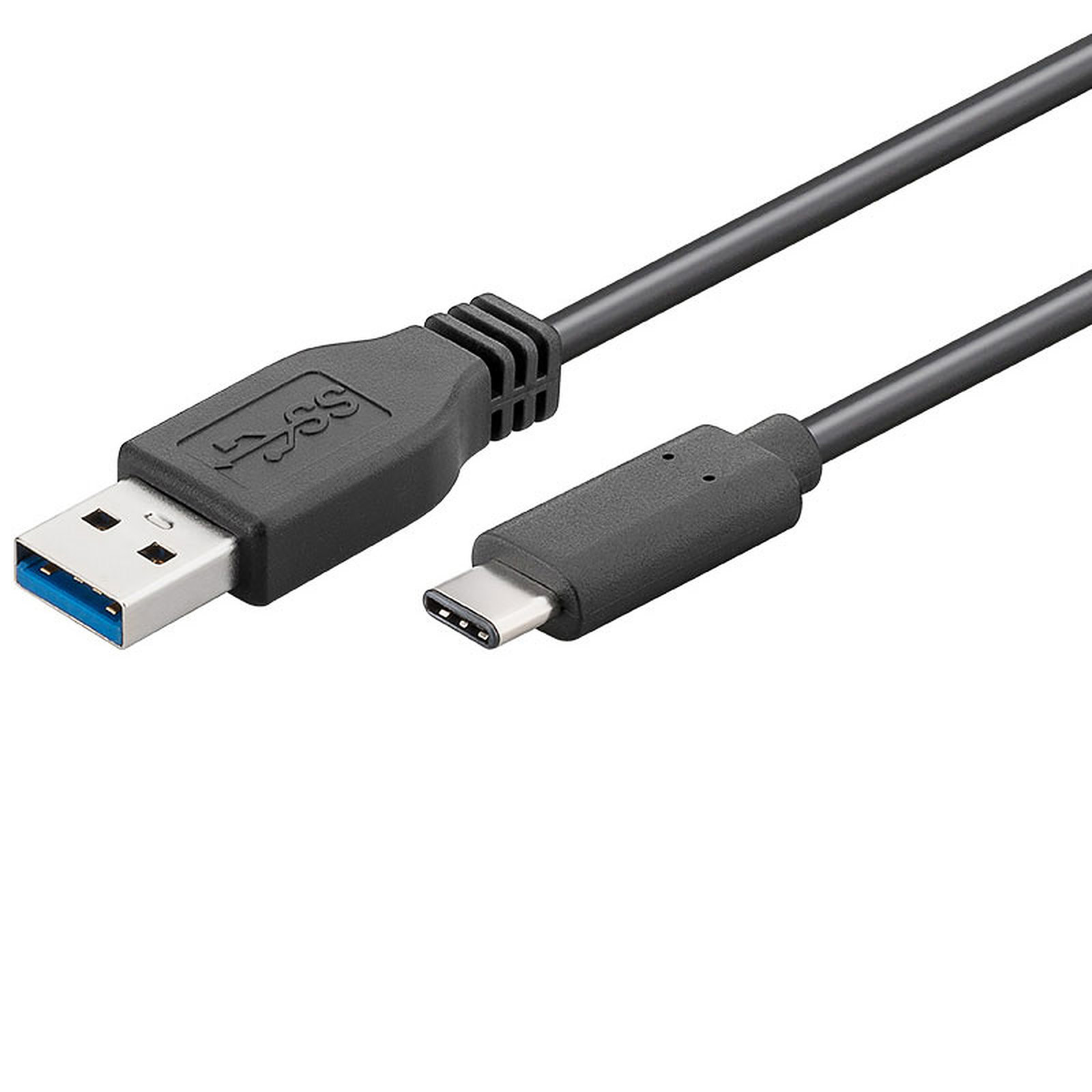
I don't have cloud on my desktop. I was trying to figure what cable would work. What does a c/data transfer cable look like. I have lots of cables but don't know their names.
 
Upvote 0

returntosender

EL ROI
Site Supporter
May 30, 2020
9,760
4,409
casa grande
✟414,554.00
Country
United States
Gender
Female
Faith
Christian
Marital Status
Private
Politics
US-Others
If you get e-mail on the cell then you can just e-mail yourself the pics and get them when you check e-mail on the cell.
Good idea, but slow. If all else fails that will be next:)
 
Upvote 0

Wookiee

Cool. Cool, cool, cool.
Jul 19, 2013
329
137
Australia
✟71,196.00
Country
Australia
Gender
Male
Faith
Christian
Is your desktop Internet connected at all? You can sign up to free services (like the ones I mentioned) on both your phone and desktop.

I don't have cloud on my desktop. I was trying to figure what cable would work. What does a c/data transfer cable look like. I have lots of cables but don't know their names.

iu
 
Upvote 0

Wookiee

Cool. Cool, cool, cool.
Jul 19, 2013
329
137
Australia
✟71,196.00
Country
Australia
Gender
Male
Faith
Christian
It's faster than all the other ideas. I use it.

With all due respect, that is definitely the slowest of the three options provided, especially depending on all the factors involved (email provider, ISP, mail client/s). If you have to upload something to the Internet, it's going to be far more efficient (and reliable) to store it in the cloud than an email server.

It works. It's an option. I'm not arguing that - it's just not the best option.
 
Upvote 0

IceJad

Regular Member
May 23, 2005
2,151
1,448
43
✟146,659.00
Country
Malaysia
Faith
Lutheran
Marital Status
Single
I don't have cloud on my desktop. I was trying to figure what cable would work. What does a c/data transfer cable look like. I have lots of cables but don't know their names.

It's the same cable you use to charge your phone. You can use the below guide to help you through. Instead of copy file from the phone to pc just to the opposite.

 
Upvote 0

ewq1938

Well-Known Member
Christian Forums Staff
Administrator
Site Supporter
Nov 5, 2011
45,643
6,961
✟1,086,169.00
Country
United States
Gender
Male
Faith
Christian
Marital Status
Single
With all due respect, that is definitely the slowest of the three options provided, especially depending on all the factors involved (email provider, ISP, mail client/s). If you have to upload something to the Internet, it's going to be far more efficient (and reliable) to store it in the cloud than an email server.

It works. It's an option. I'm not arguing that - it's just not the best option.


I have used all three ways and the e-mail way is the easiest and fastest as it is instant for me.
 
  • Agree
Reactions: Sophrosyne
Upvote 0

Sophrosyne

Let Your Light Shine.. Matt 5:16
Jun 21, 2007
163,215
64,198
In God's Amazing Grace
✟910,522.00
Gender
Male
Faith
Christian
I agree with emailing the pics to yourself, I personally have a separate email account just for my phone to receive files from my desktop computer on my normal email account. Hooking up a cable between a computer and phone and trying to move files from one to another requires some skill in usage of both such that if you are asking how to do it here then likely you would get lost trying to find the pic on your computer and moving it to your phone have problems where it landed to view it but an email with a pic on it if you mess up downloading the pic from email you can try over and over as long as you don't delete the email it is still there.
 
Upvote 0

returntosender

EL ROI
Site Supporter
May 30, 2020
9,760
4,409
casa grande
✟414,554.00
Country
United States
Gender
Female
Faith
Christian
Marital Status
Private
Politics
US-Others
Do you have your charging/data transfer cable? Plug it into your desktop and cell. In your cell give permission for the desktop to access your cell. Then copy and paste like you normally do.

Else just upload to cloud storage and down from your cell.
It's plugged into the USB charging. It doesn't give me the choice of charge or transfer.
How do you give permission for the desktop to access the cell?
 
Upvote 0

returntosender

EL ROI
Site Supporter
May 30, 2020
9,760
4,409
casa grande
✟414,554.00
Country
United States
Gender
Female
Faith
Christian
Marital Status
Private
Politics
US-Others
It's plugged into the USB charging. It doesn't give me the choice of charge or transfer.
How do you give permission for the desktop to access the cell?
Thats okay, I was just trying to make it easier on myself:doh:
 
Upvote 0